Google’s Chrome V57 Will Heighten The Need For SSL Certificate.
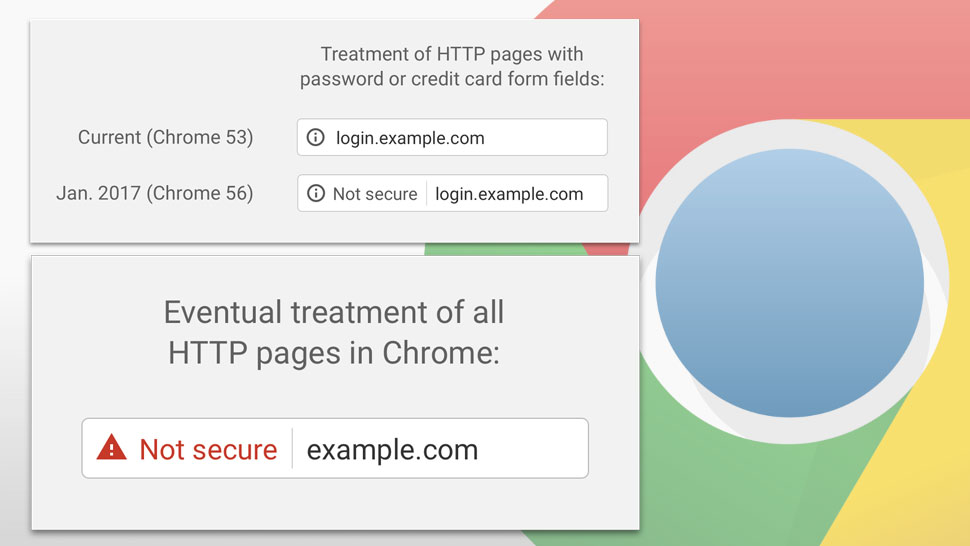
This past January Google Chrome and Firefox started providing a small warning in the address bar of its browsers, letting you know that the website you are visiting is not secure. Non-secure websites are really no issue and have never been much of a concern when financial or sensitive personal data have not been changing hands between the website and your browser, like Credit Card info or passwords that you use at financial institutions. As such this warning wasn’t really noticed that much by web visitors at large. Well, if you run a site that is still on HTTP and thought that was bad, the newest version of Google Chrome is about to make it worse. In the next version of Chrome V57, a new and more visible warning will be presented whenever you are filling out a form on someone’s website that doesn’t contain an SSL Security Certificate and https:// prefix to the web address. This “Not Secure” warning in the address bar, an in-form warning will also appear directly below the fields. This will make the warning significantly more noticeable to end users and hopefully help them avoid insecure transmission of their data.
This new change sends a message to us web developers all over that we need to be concerned about. Our clients that rely on contact forms or order forms on websites to manage their customer base, will obviously see a drop in web communication based on this new warning. This could potentially mean a loss of business and or a loss of public trust in your website.
There is a cost associated with having a security certificate of course and that cost is yearly. As a hosting provider, we recommend each website have its own IP address for an SSL certificate to be properly recognized. While Muskoka Graphics does provide support for SNI which allows security certificates for websites that share an IP address to have an SSL certificate, some browsers do not recognize SNI, which leaves you covering only a good part of your audience rather than all of your audience. A standard SSL is all that is really needed to provide no warning for regular forms used to contact your company, or provide order information, however, if your website is selling product a much more expensive SSL should be considered to provide the insurance needed to cover you in case some hacker manages to grab sensitive data from your site and your company is sued for that breach of data.